Why Purpose-Led Branding in India Is Winning Consumer Trust in 2026
Why Purpose-Led Branding in India Is Winning Consumer Trust in 2026 Purpose-led branding in India is winning trust because Indian...
Read More → 
THE BEST MARKETING CONSULTANT IN DELHI
PPC campaign mistakes can quietly drain your Google Ads budget if they’re not identified and fixed early. If your Google Ads spend keeps climbing but sales don’t move with it, the problem is usually hiding in plain sight. Most PPC campaign mistakes aren’t exotic — they’re a handful of setup errors that quietly bleed budget every single day the campaign runs. Fix them, and the same spend can often produce noticeably more conversions without increasing your daily cap.
Here’s where the money actually leaks, and what to do about each one.
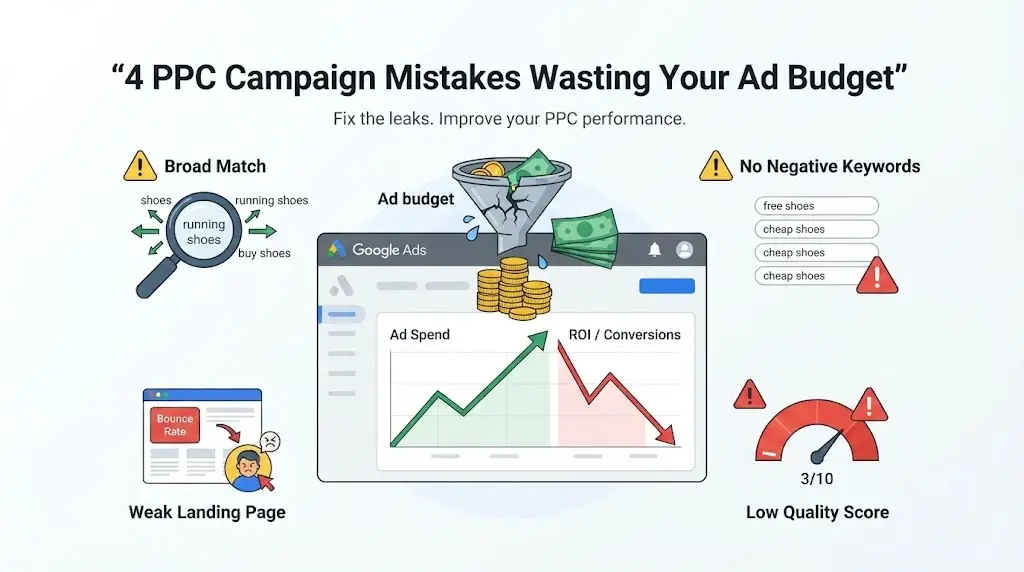
Broad match keywords are the single biggest source of google ads budget waste for accounts that haven’t been tuned. Google’s algorithm interprets “broad” generously — a keyword like running shoes can trigger your ad for searches like “how running shoes are made” or “best running shoe brands 2020,” neither of which has any buying intent.
Broad match isn’t inherently bad — it’s useful for discovery once you pair it with strong automated bidding and a clean negative keyword list. The mistake is using broad match as your only match type from day one, with no guardrails around it. If you’re new to a campaign or working with a limited budget, phrase match or exact match will almost always convert more efficiently, even if the volume looks smaller in the dashboard.
Quick check: Pull your Search Terms report right now. If more than 20-25% of your spend is going to queries that don’t resemble your actual keywords, broad match is the leak.
This is where a lot of accounts lose money without anyone noticing for months. No negative keywords means your ads show for searches you’d never actually want to pay for — “free,” “jobs,” “salary,” “course,” “DIY,” or competitor brand names you have no intention of bidding on.
A negative keyword list isn’t a one-time setup task. It’s a living document. Every week, new irrelevant search terms show up in the Search Terms report, and every week they need to get added to your exclusion list — at the ad group level for specific irrelevant terms, and at the campaign level for broader exclusions that apply everywhere.
Accounts that treat negative keywords as “set once and forget” typically see 15-30% of spend going toward searches that were never going to convert. That’s not a rounding error — that’s real budget that could’ve gone toward the searches that do convert.
You can have the tightest keyword list and the sharpest ad copy in the world, and it still won’t matter if the click lands on a slow, generic, or mismatched page. Poor landing pages are where clicks turn into bounces instead of conversions — and Google notices the pattern too.
A few landing page problems that come up constantly:
The fix isn’t necessarily a full redesign. Often it’s as simple as building a dedicated landing page per campaign theme instead of pointing every ad at your generic homepage. A page built around one offer, one CTA, and one message consistently outperforms a page trying to be everything to everyone.
Quality Score is Google’s way of judging whether your ad, keyword, and landing page actually belong together — and it directly affects both your cost-per-click and your ad rank. Ignore it, and you end up paying more for the same position a better-optimized competitor gets for less.
Quality Score is built from three things: expected click-through rate, ad relevance, and landing page experience. ppc optimization errors almost always trace back to a weak score in one of these three areas — usually ad copy that doesn’t closely match the keyword group it sits in, or a landing page that doesn’t reinforce the ad’s message.
The practical fix is tighter ad groups. Instead of ten loosely related keywords sharing one ad, group keywords by close intent and write ad copy that speaks directly to that specific group. It takes more setup time upfront, but the relevance boost lowers your cost-per-click over time — which compounds across every month the campaign runs.
None of these four problems exist in isolation. Broad match without negatives sends irrelevant traffic to a landing page that isn’t built for it, which tanks your Quality Score, which raises your CPC, which means your already-wasted budget stretches even further before it runs out. One fix helps. Fixing all four together is where accounts actually turn around.
It varies by account, but unmanaged broad match combined with a thin negative keyword list commonly wastes anywhere from 15% to 40% of monthly spend. The number tends to shrink fast once a proper audit and cleanup happens.
Not necessarily — the answer depends on your bidding strategy and how mature your account is. Newer or budget-constrained accounts usually do better starting with phrase or exact match and expanding to broad match later, once conversion data and negative keywords are solid.
Yes, directly. A higher Quality Score can lower your cost-per-click for the same ad position, because Google factors it into the ad auction alongside your bid.
Weekly is ideal for active campaigns. At minimum, review the Search Terms report every two weeks so irrelevant queries don’t quietly eat budget for a full month before anyone catches them.
No — often a dedicated, offer-specific page with a faster load time and a clear single CTA fixes most of the conversion drop, without needing a complete rebuild of the site.
No. Smart Bidding needs conversion data to work well, and if broad match is pulling in irrelevant clicks, the algorithm is learning from bad signals. Negatives and match type discipline need to come first, then automated bidding compounds the improvement instead of the mess.
Usually because the negative was added at the wrong level, or it’s an exact-match negative when a broader phrase or campaign-level negative was needed. Match type matters just as much for negatives as it does for regular keywords.
Not directly, but a very low score (1-3) can push your ad rank so far down that you rarely win the auction at a bid you’re willing to pay, which has the same practical effect.
Search Terms cleanup and negative keyword additions usually show a spend shift within a week or two. Quality Score improvements from tighter ad groups take longer — typically 3-4 weeks of consistent data before Google fully re-scores the account.
Broad match and negative keyword issues are Search-specific, but poor landing pages and weak signal quality hurt Performance Max just as much — arguably more, since PMax leans even harder on landing page and conversion data to decide where to spend.
If any of these four mistakes sound familiar in your own account, the fix usually isn’t a bigger budget — it’s a tighter setup. For a closer look at what’s specifically happening in your campaigns, our PPC Expert services cover exactly this kind of audit and cleanup, from match type strategy to landing page alignment and Quality Score improvement.
You can reach out directly to Ritwik Sachdeva at 9289626386, or check the full range of services at ritwiksachdeva.in, to get a clear read on where your budget is actually going before the next billing cycle starts.