Why Purpose-Led Branding in India Is Winning Consumer Trust in 2026
Why Purpose-Led Branding in India Is Winning Consumer Trust in 2026 Purpose-led branding in India is winning trust because Indian...
Read More → 
THE BEST MARKETING CONSULTANT IN DELHI
AI design tools are changing how branding work gets done, but not who is responsible for it. They make the slow, repetitive parts of the job (moodboards, first-draft logos, resizing assets) much faster. They can’t decide what a brand should stand for, and that decision is still the hard part. If you’re weighing ai design tools branding workflows against hiring a designer or consultant, the useful question is which parts of the process to hand to the tool and which to keep human.
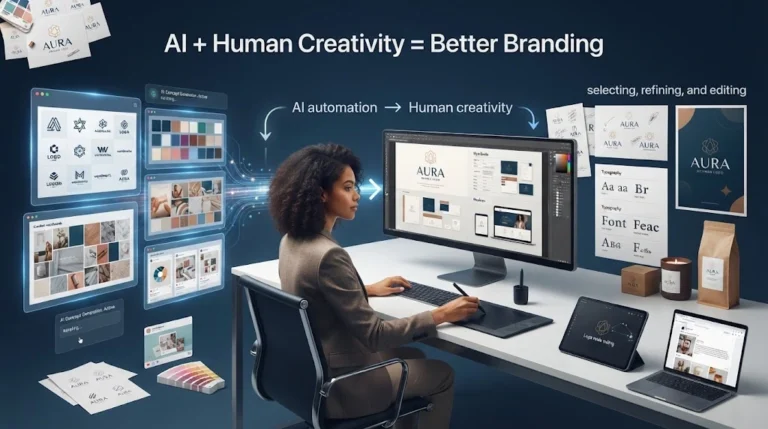
Most of the tools in this space, from image generators to layout assistants, are good at three things.
Speed on first drafts. A generative design tool can produce thirty logo directions in the time it takes a person to sketch three. That’s real value when you’re exploring a direction, not finalising one.
Repetitive production work. Resizing a logo for twelve social formats, generating background variations, or cleaning up product photos is where design automation saves hours without hurting quality.
Getting unstuck. Creative AI assistants are useful when you can’t describe what you want. Typing a rough idea and reacting to what comes back is often faster than staring at a blank artboard.
The weak spots show up once a design has to work as a brand, not as a single image.
The “ai vs human designer” framing assumes they do the same job. They don’t. A branding project has roughly two layers:
AI is strongest in the second layer and weakest in the first. A human designer or brand consultant is valuable mostly in the first layer, and a good one uses AI tools in the second to move faster. That’s the “changing, not replacing” part. The role shifts from drawing every asset by hand to directing, editing, and rejecting.
If you’re building or refreshing a brand, here’s a split that keeps the tool useful without letting it steer.
Step 1: Define the brand before opening any tool. Write down your audience, your three or four core values, what you want customers to feel, and what you never want to look like. This is the brief the tool lacks.
Step 2: Use AI for exploration. Generate moodboards, colour palettes, and rough logo directions. Treat everything as raw material. Save what’s interesting and discard the rest.
Step 3: Refine by hand. Pick one direction and rebuild it properly: clean vector shapes, deliberate spacing, typography chosen for readability on small screens. This is where most AI-generated logos need real work, because they often look fine at full size and fall apart at favicon size.
Step 4: Lock the system. Document your colours, fonts, logo clear-space, and usage rules so every future asset, AI-assisted or not, follows the same rules. This step is what turns a nice logo into a brand. The principles behind it are covered in our guide to consistent brand identity.
Step 5: Use automation for production. Once the system exists, tools can safely generate resizes, social variations, and ad creatives inside those rules.
Task | Good for AI | Needs a human |
Moodboards and inspiration | ✅ | |
First-draft logo concepts | ✅ | Final selection and refinement |
Brand positioning and messaging | ✅ | |
Colour and type system rules | Suggestions | ✅ Final decisions |
Social post and ad resizing | ✅ | |
Packaging and print-ready files | Drafts | ✅ Production checks |
Brand guidelines | ✅ |
For ecommerce sellers, the pressure is usually speed. You need product listings, banners, and ad creatives constantly. AI tools help with that volume. But your logo, colours, and tone are what make a returning customer recognise you across a marketplace, your own store, and social media. That layer deserves deliberate decisions, not a prompt.
If you’re sorting out which parts of your branding to automate and which to build properly, the branding consultant in Delhi page explains how brand strategy and design work together.
Not for the strategic part. AI can take over some production tasks, but positioning, consistency, and judgement about what fits your audience still need a person making the decisions.
Mostly exploration and production: moodboards, colour palette ideas, first-draft logo concepts, social media resizes, and ad creative variations. They’re less useful for deciding what your brand should say or who it’s for.
It can be, but check two things first. Read the tool’s commercial-use terms, and make sure the design is distinct enough that it doesn’t resemble an existing mark. If you plan to trademark it, confirm that early, because rules around AI-generated work vary and are still evolving.
It depends on the job. Image generators suit early exploration, layout assistants suit social and marketing assets, and vector editors are still where you clean up and finalise a logo. No single tool handles the whole branding process well, so most workflows combine two or three.
Write a short brand guide first: colours, fonts, logo spacing, and tone. Then generate everything inside those limits and reject outputs that break them, however good they look on their own. Tools generating in separate sessions will drift otherwise.
A human designer handles decisions: positioning, tone, and what the brand should avoid. AI mainly handles execution and speed. The most practical setup is a person directing the work and using AI tools to move faster on the repetitive parts.
It can lower the cost of production and early exploration. Strategy, refinement, and building a usable brand system still take time and skill, so expect savings in execution, not in the thinking behind it.
You can generate a logo and a few visuals, but a brand identity also needs a rule system, a clear audience, and a consistent voice. Without those, you end up with a collection of nice images, not a brand people recognise.
Often, yes, especially from short, vague prompts. Tools lean on patterns from existing design, so competitors using similar prompts can end up looking alike. Starting from a written brand definition and refining the output by hand is what makes the result specific to you.
Yes, for volume work like product banners, ad variations, and resizing. But keep your logo, colours, and tone as deliberate decisions, since those are what help a customer recognise you across marketplaces, your own store, and social media. If you’re unsure where to draw that line, you can talk to a branding consultant in Delhi.
If you’re not sure whether to build your brand with AI tools, a designer, or a mix of both, a short conversation can save you from redoing it later. Reach out to Ritwik Sachdeva through ritwiksachdeva.in or call 9289626386 to discuss your brand and work out what’s worth automating.