Why Purpose-Led Branding in India Is Winning Consumer Trust in 2026
Why Purpose-Led Branding in India Is Winning Consumer Trust in 2026 Purpose-led branding in India is winning trust because Indian...
Read More → 
THE BEST MARKETING CONSULTANT IN DELHI
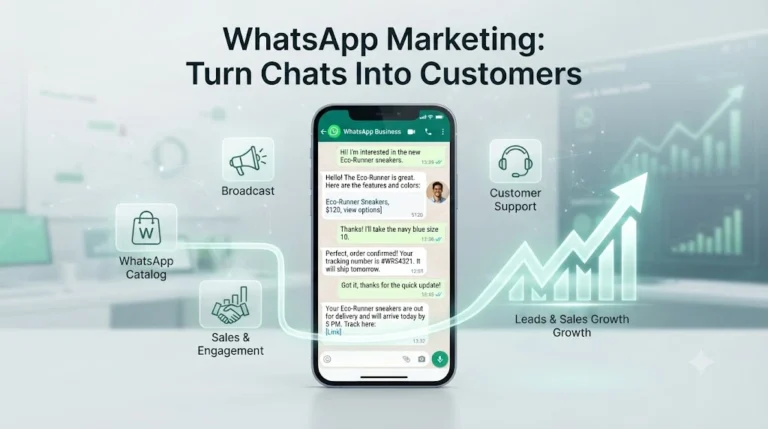
WhatsApp Marketing is becoming an effective way for brands to connect with customers, promote products, and drive conversations that can lead to sales. Brands typically use WhatsApp to send opted-in updates and offers through broadcast lists or approved templates, showcase products through a WhatsApp catalog, and handle enquiries, orders, and customer support in the same chat thread. Unlike traditional advertising, WhatsApp works as a direct conversation channel, making customer interaction more personal and immediate.
That distinction explains why some brands see replies and orders from WhatsApp while others just collect blocks and reports.
Email and Instagram are places people visit or scroll past. WhatsApp sits next to messages from family and friends, so any brand message there feels personal, and irrelevant ones feel like an intrusion. That is the upside and the risk.
For Indian brands, the appeal is practical. Customers already ask “price kya hai?” or “COD available hai?” over WhatsApp. Meeting them there removes a step. No app to install, no form to fill, no login.
Most of the confusion in this topic comes from mixing these two up.
WhatsApp Business App is the free app for small teams. You get a business profile, quick replies, greeting and away messages, labels to sort chats, and a product catalog. One or a few people manage it from a phone or desktop.
WhatsApp Business API (Platform) is for brands that need scale: multiple agents on one number, automation, chatbots, CRM integration, and template messages sent to opted-in customers. You access it through an approved provider, and messaging is charged by Meta’s pricing model, which changes periodically. Check current rates before budgeting.
A brand handling a few dozen chats a day can run well on the app. If your team is drowning in messages or you need order updates triggered automatically from your store, that’s the API.
A broadcast list sends one message to many contacts, and each recipient sees it as a normal one-to-one chat. It’s the simplest way to share a new arrival or a restock alert.
Two limits shape how you use it:
Because of the saved-number rule, you need to ask people to save your number and tell them what they’ll receive. A quick “Save this number to get restock alerts” on your website, packaging insert, or Instagram bio works better than adding people who never asked.
Segment before you send. A list split by interest (say, new customers, repeat buyers, and people who asked about a specific product) gets far better replies than one message to everyone. Even a basic label system in the Business App lets you do this.
Mistakes that get numbers reported:
A catalog on WhatsApp lets customers browse products, prices, and descriptions without leaving the chat. When someone asks “Do you have this in blue?”, you can send the exact product instead of a screenshot and a paragraph.
To make it work:
If you already run an online store, your product data likely exists in a spreadsheet or on your website. Getting it into a clean catalog format is mostly an organisation job, and it’s a job that ecommerce teams often skip.
Conversational commerce means the whole buying journey (enquiry, recommendation, price confirmation, payment link, order update) happens in one thread. For brands searching for WhatsApp commerce in India, this is the model that fits how people already shop: they ask, negotiate a little, confirm, and pay.
A typical flow that works:
The follow-up step gets overlooked most. A short message after delivery (“Did it fit? Anything we can fix?”) catches problems before they become bad reviews, and it often leads to repeat orders.
Automation is worth using for the repetitive 70% of questions. It goes wrong when it traps people. Whatever you automate, always leave an easy exit to a human, and write your automated messages the way your team actually talks. If your customers write in Hinglish, a stiff English auto-reply feels off. Language matters here more than most brands expect, which is covered in our piece on vernacular content and how regional-language messaging changes response rates.
Skip vanity numbers. These are more useful:
WhatsApp works best as the closing and retention layer. Instagram, Facebook, and search bring people in, and WhatsApp handles the conversation where they decide. Treating it as a standalone broadcast tool wastes most of its value. If you’re mapping how these channels connect, the social media marketing consultant in Delhi page explains the wider approach.
Not to start. The Business App covers catalogs, quick replies, labels, and small broadcast lists. Move to the API when message volume, team size, or automation needs outgrow it.
Most often, the recipient hasn’t saved your number. A broadcast only goes to contacts who have your number saved, and only to those on that specific list.
In a group, everyone sees each other and can reply to the whole group. In a broadcast list, each person gets your message as a private one-to-one chat, and their replies come back only to you. For promotions and updates, broadcast lists are usually the better fit.
You should have clear permission first. An enquiry about one product isn’t consent for regular offers. Ask the customer, tell them what they’ll receive, and give them an easy way to stop.
Give people a specific reason. “Save this number for restock alerts” works better than “join our list”. Place the invitation where customers already are: your website, order confirmation page, packaging insert, or Instagram bio.
Clear product photos, accurate titles, prices, and short descriptions covering what customers usually ask (size, material, delivery time). Remove or update anything that’s out of stock so chats turn into orders.
There’s no universal number. Start with low frequency, watch replies and opt-outs, and send only when you have something worth the customer’s attention. A rising block rate is the signal to slow down.
Email is easy to ignore and SMS feels transactional. WhatsApp is conversational: customers can reply, ask questions, and complete a purchase in the same thread. That also means you need to be ready to respond quickly, which email doesn’t demand.
Write in the language your customers actually use with you. If they message you in Hinglish or a regional language, replying in stiff English feels off. We cover this in more detail in our guide on vernacular content.
No. Service businesses, local retailers, and B2B teams use it for bookings, quotes, and follow-ups. It suits any business where customers prefer to ask a question before they buy.
If you’re unsure where to begin, whether that’s setting up the catalog, structuring your lists, or mapping the chat flow from ad to order, get in touch with Ritwik Sachdeva. Call 9289626386 or visit ritwiksachdeva.in and share what you sell and how customers reach you today. From there, we can work out what your WhatsApp setup needs.